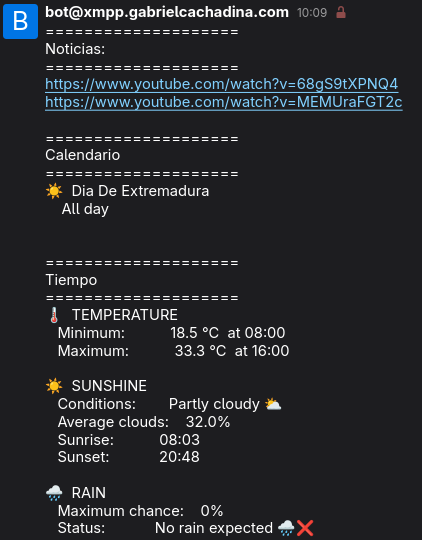
Bot that gathers the information of the day
While hiking a trail around Olivenza, I had an epiphany. Every morning when I get up, I follow the same routine:
- I check the weather to know how much clothing I need or whether I need an umbrella.
- I check my calendar in case I have an appointment or commitment I had forgotten about.
- I catch up on the latest news.
The problem is that all this information is scattered across a series of websites that do not communicate with each other. So, I decided to create an XMPP bot that would provide me with all this information on a daily basis.
In this tutorial, I will show how to retrieve the data needed for each of these tasks and send it through an XMPP account.
Weather
There are countless APIs that allow you to retrieve all kinds of weather information for a specific location. I decided to use Open-Meteo, as it allows me to make a granular request containing only the information I need. In this case, I request:
- Probability of precipitation
- Cloud cover percentage
- Hourly temperatures
- Sunrise and sunset times
The information is then extracted and processed to determine the minimum and maximum temperatures, as well as the times at which they will occur. Finally, I added a series of icons based on precipitation and cloud cover.
 1import requests
 2...
 3URL_WEATHER = "https://api.open-meteo.com/v1/forecast"
 4params = {
 5    "latitude": 38.8779,
 6    "longitude": -6.9706,
 7
 8    "daily": "sunrise,sunset",
 9
10    "hourly": (
11        "temperature_2m,"
12        "precipitation_probability,"
13        "cloud_cover"
14    ),
15
16    # Badajoz local time
17    "timezone": "Europe/Madrid",
18
19    "forecast_days": 1,
20}
21...
22response = requests.get(URL_WEATHER, params=params)
23response.raise_for_status()
24
25data = response.json()
26
27hourly = data["hourly"]
28times = hourly["time"]
29temperatures = hourly["temperature_2m"]
30rain_probability = hourly["precipitation_probability"]
31cloud_cover = hourly["cloud_cover"]
32
33# Daily Data
34daily = data["daily"]
35date = daily["time"][0]
36sunrise = daily["sunrise"][0]
37sunset = daily["sunset"][0]
38
39# Min_Max Temperatures
40temp_min = min(temperatures)
41temp_max = max(temperatures)
42min_index = temperatures.index(temp_min)
43max_index = temperatures.index(temp_max)
44min_time = times[min_index][11:16]
45max_time = times[max_index][11:16]
46
47# Get hours with significant temperature changes
48hottest_temp = temperatures[max_index]
49coldest_temp = temperatures[min_index]
50
51# Rain
52max_rain_probability = max(rain_probability)
53if max_rain_probability == 0:
54    rain_status = "No rain expected 🌧️❌"
55elif max_rain_probability <= 20:
56    rain_status = "Very low chance of rain 🌦️"
57elif max_rain_probability <= 40:
58    rain_status = "Low chance of rain 🌦️"
59elif max_rain_probability <= 60:
60    rain_status = "Moderate chance of rain 🌦️"
61else:
62    rain_status = "High chance of rain 🌧️"
63
64# Sunshine
65average_cloud = sum(cloud_cover) / len(cloud_cover)
66if average_cloud <= 10:
67    sunshine = "Very sunny ☀️"
68elif average_cloud <= 30:
69    sunshine = "Mostly sunny 🌤️"
70elif average_cloud <= 60:
71    sunshine = "Partly cloudy ⛅"
72else:
73    sunshine = "Mostly cloudy ☁️"
74
75result_weather = f"""
Calendar
For this, I access my own Radicale server, which contains all the events from my day-to-day life. The Python script retrieves the events for that day and, if they have a scheduled time, stores that as well.
I only use a single calendar, but it would be possible to integrate multiple calendars if necessary.
 1import caldav
 2from datetime import datetime, date, timedelta
 3from zoneinfo import ZoneInfo
 4...
 5URL = credentials.URL
 6USERNAME = credentials.USERNAME
 7PASSWORD = credentials.PASSWORD
 8...
 9calendar_lines = []
10
11with caldav.DAVClient(
12    url=URL,
13    username=USERNAME,
14    password=PASSWORD,
15    auth_type="basic",
16) as client:
17    principal = client.principal()
18
19    calendar_lines.append("=" * 20)
20    calendar_lines.append(
21        f"Calendar"
22    )
23    calendar_lines.append("=" * 20)
24
25    for calendar in principal.calendars():
26        calendar_name = calendar.get_display_name()
27
28        if calendar_name.upper() == "TODO":
29            continue
30
31        events = calendar.search(
32            start=start,
33            end=end,
34            event=True,
35            expand=True,
36        )
37
38        if not events:
39            continue
40
41        for event in events:
42            component = event.icalendar_component
43
44            for vevent in component.walk():
45                if vevent.name != "VEVENT":
46                    continue
47
48                summary = str(vevent.get("SUMMARY", "Untitled"))
49                dtstart = vevent.get("DTSTART")
50                dtend = vevent.get("DTEND")
51
52                if not dtstart:
53                    continue
54
55                start_value = dtstart.dt
56                end_value = dtend.dt if dtend else None
57
58                if isinstance(start_value, datetime):
59                    start_value = start_value.astimezone(tz)
60
61                    if end_value and isinstance(end_value, datetime):
62                        end_value = end_value.astimezone(tz)
63
64                    calendar_lines.append(
65                        f"🕐 {start_value.strftime('%H:%M')}"
66                        f"–{end_value.strftime('%H:%M') if end_value else '?'}"
67                    )
68                    calendar_lines.append(f"   {summary}")
69
70                elif isinstance(start_value, date):
71                    calendar_lines.append(f"☀️  {summary}")
72                    calendar_lines.append("    All day")
73
74                calendar_lines.append("")
75
76result_calendar = "\n".join(calendar_lines)
News
For the news, I could not find an RSS feed that provides a daily summary of the most important news from around the world. Usually, RSS feeds are simply a stream of news articles published over time, following the philosophy behind RSS.
For this reason, I decided to use news videos from YouTube.
To achieve this, I select playlists that publish new news videos every day and use yt-dlp to retrieve the URL of the latest video.
 1import yt_dlp
 2...
 3PLAYLIST_URLS = [
 4    "https://www.youtube.com/playlist?list=PLFLBjMW4wU7gYcRxzvIV9oAL7VIqmJbOW",
 5    "https://www.youtube.com/playlist?list=PLZhRxE9191zPN4uc07ytohaXcS13qEgm2",
 6]
 7
 8opts = {
 9    "extract_flat": True,
10    "playlistend": 1,
11    "quiet": True,
12}
13
14news_urls = []
15
16with yt_dlp.YoutubeDL(opts) as ydl:
17    for playlist_url in PLAYLIST_URLS:
18        info = ydl.extract_info(playlist_url, download=False)
19
20        latest = info["entries"][0]
21
22        if latest and latest.get("id"):
23            news_urls.append(
24                f"https://www.youtube.com/watch?v={latest['id']}"
25            )
26
27result_news = "\n".join([
28    "====================",
29    "News:",
30    "====================",
31    *news_urls,
32    "",
33])
XMPP
All of this information needs to be sent somewhere. Originally, I considered adding a section to my website with the day’s news, but I did not want to have to visit a website and refresh it every day.
That is why I use my own XMPP server to send myself the information, which has been previously assembled into strings.
 1import asyncio
 2from slixmpp import ClientXMPP
 3...
 4result = "\n".join([
 5    result_news,
 6    result_calendar,
 7    result_weather
 8])
 9
10
11class XMPPClient(ClientXMPP):
12    def __init__(self, jid, password, recipient, message):
13        super().__init__(jid, password)
14
15        self.recipient = recipient
16        self.message = message
17
18        self.add_event_handler("session_start", self.session_start)
19
20        # XMPP errors
21        self.add_event_handler("failed_auth", self.failed_auth)
22        self.add_event_handler("connection_failed", self.connection_failed)
23        self.add_event_handler("disconnected", self.disconnected_handler)
24        self.add_event_handler("stanza_error", self.stanza_error)
25
26    async def session_start(self, event):
27        print("XMPP: session started", flush=True)
28
29        self.send_presence()
30        print("XMPP: presence sent", flush=True)
31
32        await self.get_roster()
33        print("XMPP: roster received", flush=True)
34
35        self.send_message(
36            mto=self.recipient,
37            mbody=self.message,
38            mtype="chat"
39        )
40
41        print("XMPP: message sent", flush=True)
42
43        await asyncio.sleep(1)
44
45        print("XMPP: disconnecting", flush=True)
46        self.disconnect()
47
48    def failed_auth(self, event):
49        print("XMPP ERROR: authentication failed", flush=True)
50        print(f"XMPP ERROR DETAILS: {event}", flush=True)
51        self.disconnect()
52
53    def connection_failed(self, event):
54        print("XMPP ERROR: connection failed", flush=True)
55        print(f"XMPP ERROR DETAILS: {event}", flush=True)
56
57    def stanza_error(self, event):
58        print("XMPP ERROR: stanza error", flush=True)
59        print(f"XMPP ERROR DETAILS: {event}", flush=True)
60
61    def disconnected_handler(self, event):
62        print("XMPP: disconnected", flush=True)
63
64
65async def main():
66    client = XMPPClient(
67        jid=credentials.jid,
68        password=credentials.password,
69        recipient=credentials.recipient,
70        message=result
71    )
72
73    client.connect()
74    await client.disconnected
75
76
77if __name__ == "__main__":
78    asyncio.run(main())
Server
Finally, I need a way to automate all of this. I do not want to get up every morning, turn on my computer, run a script, and only then be able to start my daily routine.
There are many ways to achieve this. For example, I could create a cron job that points to the script, modify the script so that it runs continuously and retrieves the information every day, or leave it running with screen, a Docker container, or any number of other solutions.
However, regular readers will know that I am a huge fan of NixOS. So, I wanted something that would keep all the code and its runtime configuration in a single .nix file.
My solution is to store the Python code in one variable, define its Python environment in another, and then use a systemd service to run it every day at 7:00 AM.
 1{ config, pkgs, ... }:
 2
 3let
 4  pythonEnv = pkgs.python3.withPackages (ps: with ps; [
 5    requests
 6    yt-dlp
 7    caldav
 8    slixmpp
 9  ]);
10
11  dailyInfo = pkgs.writeText "main.py" ''
12# Your code goes here
13  '';
14
15in
16{
17  # -.-.-.-.-.-.-.-.-.-.-.-.-.-.-.-.-.-.-.-.-.-.-.-
18  # Daily Info
19  # -.-.-.-.-.-.-.-.-.-.-.-.-.-.-.-.-.-.-.-.-.-.-.-
20
21  systemd.services.daily-info = {
22    description = "Send news, calendar and weather";
23
24    serviceConfig = {
25      Type = "oneshot";
26
27      User = config.globals.username;
28
29      ExecStart = "${pythonEnv}/bin/python ${dailyInfo}";
30    };
31  };
32
33  systemd.timers.daily-info = {
34    description = "Run daily info";
35
36    wantedBy = [ "timers.target" ];
37
38    timerConfig = {
39      OnCalendar = "7:00";
40      Persistent = true;
41    };
42  };
43}
Conclusion
With this code, I have a simple way to get everything I need every morning to be prepared for the day.
On top of that, because it is a relatively simple and scalable Python script, I can add more information in the future. For example, if I changed jobs and had to commute to Cáceres every day, I could retrieve traffic information from the Google API for my commute times and take that into consideration as part of my morning briefing.
You can find the repository, which can be used as a reference and may be useful if future changes are made that modify or improve the sections of code shown in this tutorial.