Document Signing with RSA
A simple question: how can I sign documents online? The answer seems simple—just scribble something on a PDF and send it directly by email, right?
Certainly. But when you send a PDF, TXT, … anyone can copy the signature used in the document and paste it anywhere else, or even modify the content of that same document so it says something completely different from what was originally signed. In the case of an in-person signature, this is solved by having multiple parties who verify that the person physically signed the file in the presence of an unrelated third party, but doing this online is impossible.
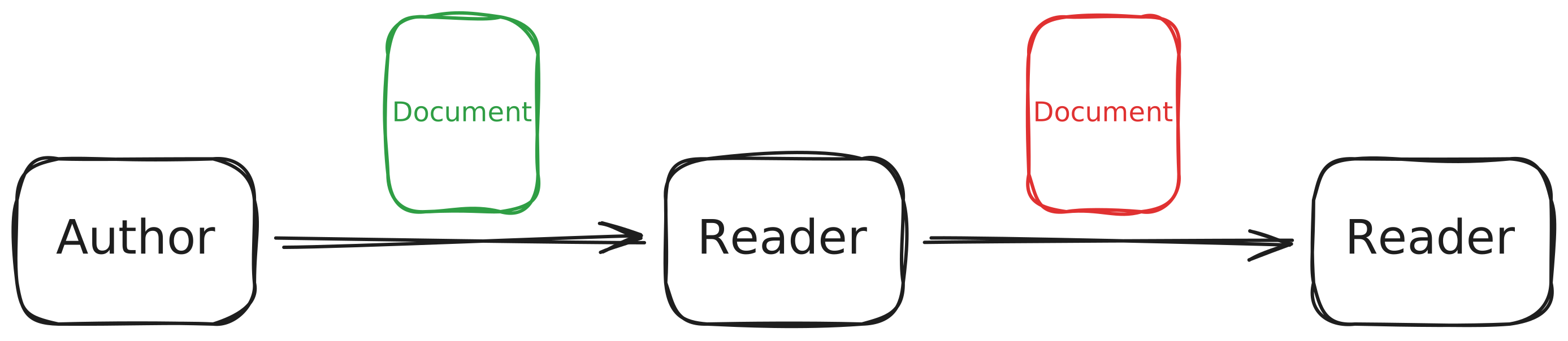
In this post we’ll see how to sign a document using the openssl utility so that it becomes impossible to modify the content or create it on behalf of someone who is not the original author. To do this, we will generate a signature file which, together with the original file (PDF, TXT, …), allows anyone to verify both the authenticity of the signature and the integrity of the file.
Theory
The RSA Algorithm
Obtaining Parameters
The RSA algorithm is used globally to encrypt any data using three numbers: one number used to encrypt, which we will call $e$; one number used to decrypt, which we will call $d$; and a shared number, which we will call $c$.
First, we choose two “large” prime numbers, which we will call $p_1$ and $p_2$, and compute their product, thus obtaining $c$: $$ c = p_1 \cdot p_2 $$
Next, we obtain the number of coprimes of this number, which for a number generated as the product of two primes follows Euler’s totient function: $$ \phi(c) = (p_1-1)(p_2-1) $$
To obtain $e$, also called the public exponent, we must choose a number that satisfies: $$ 1 < e < \phi(c) $$ $$ e \text{ is coprime with } c,\ \phi(c) $$
And to obtain $d$, also called the private exponent, we must choose any number that satisfies: $$ d \cdot e \pmod{\phi(c)} = 1 $$
To generate these numbers, we can use the following commands:
1# 4096-bit RSA private key
2openssl genpkey -algorithm RSA -out Privatekey/private.pem -pkeyopt rsa_keygen_bits:4096
3
4# Public key
5openssl rsa -pubout -in Privatekey/private.pem -out Publickey/public.pem
Encryption and Decryption
To encrypt a message $m$, text or a document, we use the public key, which is made up of $e$ and $c$: $$ \text{pub}(e,c) \rightarrow m^e \bmod(c) = n $$
This gives us a number $n$ that can only be recovered using the private key, that is: $$ \text{priv}(d,c) \rightarrow n^d \bmod(c) = m $$
SHA256
To generate a signature file, you must first understand the SHA256 algorithm, which takes any bit input and transforms it into a 256-bit string that is computationally unique for each input. This algorithm allows verifying that a file’s content has not been modified, since any alteration in the original produces a completely different hash. The theoretical explanation is complex, but I highly recommend the video by RedBlockBlue, which explains it in detail following the original white paper.
Signing Documents
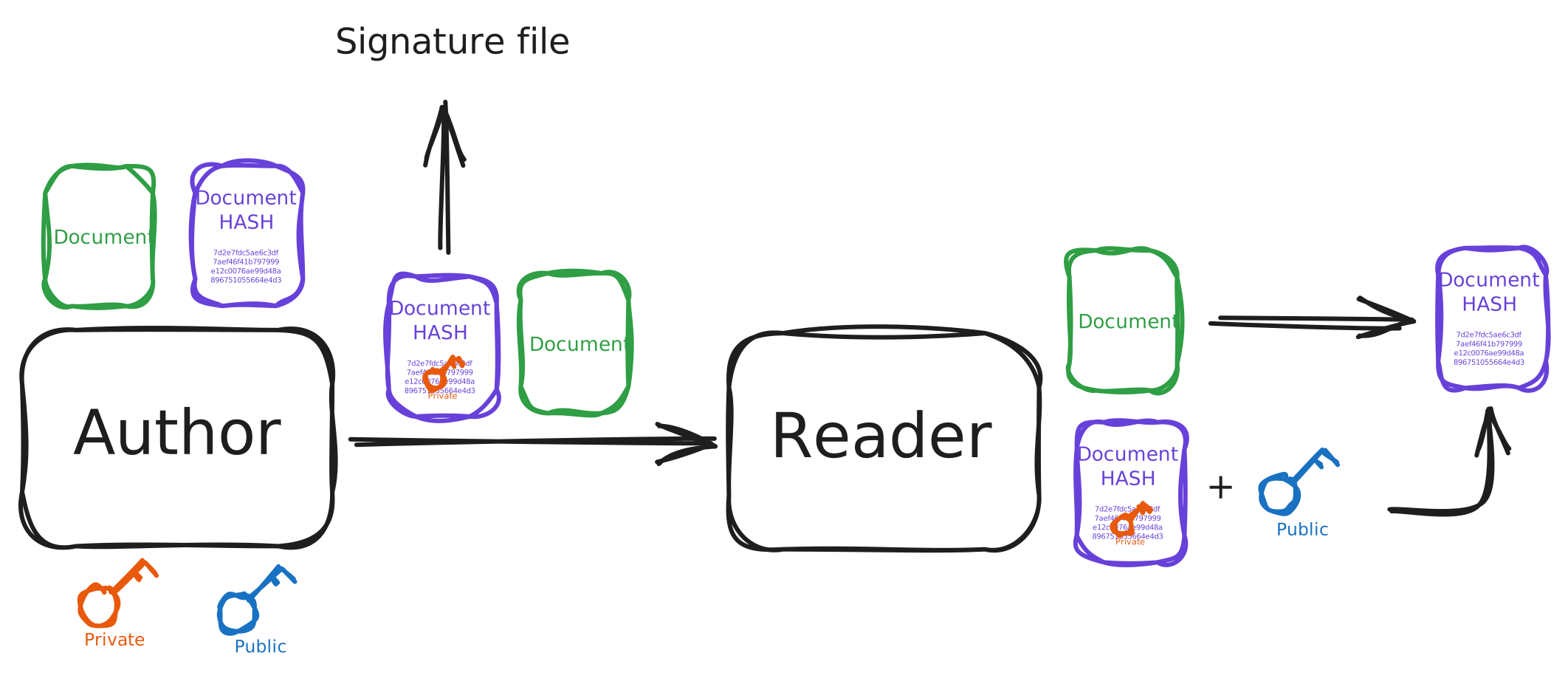
To sign documents, you first obtain the hash of the document and encrypt it using the private key. The document together with the encrypted hash (called the signature) are sent to the recipient. The recipient computes the hash of the received document and compares it with the hash recovered by decrypting the signature (using the public key). If they match, then the document is intact and the signature is authentic.
Script
Below is a small script to sign and validate documents. I hope it helps illustrate the full process of validating digital signatures:
 1#!/bin/bash
 2
 3echo "Select an operation:"
 4options=("Sign a file" "Verify a signature" "Exit")
 5select opt in "${options[@]}"; do
 6    case $REPLY in
 7        1)  # Sign a file
 8            echo "Available files to sign:"
 9            FILES=(File/*)
10            select FILE in "${FILES[@]}"; do
11                [[ -n "$FILE" ]] && break
12                echo "Invalid selection, try again."
13            done
14
15            echo "Available private keys:"
16            KEYS=(Privatekey/*)
17            select PRIVATE_KEY in "${KEYS[@]}"; do
18                [[ -n "$PRIVATE_KEY" ]] && break
19                echo "Invalid selection, try again."
20            done
21
22            BASENAME=$(basename "$FILE")
23            HASH_FILE="Hash/$BASENAME.sha256"
24            SIGN_FILE="Hash/$BASENAME.sig"
25
26            # Hash and sign
27            openssl dgst -sha256 -out "$HASH_FILE" "$FILE"
28            openssl dgst -sha256 -sign "$PRIVATE_KEY" -out "$SIGN_FILE" "$FILE"
29            rm "$HASH_FILE"
30
31            echo "Done! Signature saved to: $SIGN_FILE"
32            break
33            ;;
34        2)  # Verify a signature
35            echo "Available files to verify:"
36            FILES=(File/*)
37            select FILE in "${FILES[@]}"; do
38                [[ -n "$FILE" ]] && break
39                echo "Invalid selection, try again."
40            done
41
42            echo "Available public keys:"
43            KEYS=(Publickey/*)
44            select PUBLIC_KEY in "${KEYS[@]}"; do
45                [[ -n "$PUBLIC_KEY" ]] && break
46                echo "Invalid selection, try again."
47            done
48
49            echo "Available signatures:"
50            SIGS=(Hash/*)
51            select SIGN_FILE in "${SIGS[@]}"; do
52                [[ -n "$SIGN_FILE" ]] && break
53                echo "Invalid selection, try again."
54            done
55
56            # Verify
57            if openssl dgst -sha256 -verify "$PUBLIC_KEY" -signature "$SIGN_FILE" "$FILE"; then
58                echo "Signature is VALID."
59            else
60                echo "Signature is INVALID."
61            fi
62            break
63            ;;
64        5)  # Exit
65            echo "Exiting."
66            exit 0
67            ;;
68        *)
69            echo "Invalid option, try again."
70            ;;
71    esac
72done