Integration of Gitea with Docker Registry
Many companies rely on third parties for version control, testing, and for creating Docker containers. To reduce this dependency, I have decided to show how I manage my projects in my own environments, gaining greater autonomy, stability, and security in my workflow.
Programs
Gitea
Gitea is an excellent alternative to Github, allowing you to maintain as many repositories as you like and providing nearly all the functionalities of Github. With this, we have a solution for maintaining our code and its versioning in our own infrastructure.
Gitea Act Runner
Gitea Act Runner is a service that allows you to run Gitea actions, enabling pipelines similar to those in Github. This service can be run on a different server to separate the CI/CD server from the code versioning server. Below is a docker compose configuration that runs Gitea alongside Gitea Act Runner:
 1services:
 2  server:
 3    image: docker.io/gitea/gitea:latest
 4    container_name: gitea
 5    environment:
 6      - USER_UID=1000
 7      - USER_GID=1000
 8      - ROOT_URL=https://gitea.gabrielcachadina.com/
 9      - GITEA__SERVICE__REGISTER_MANUAL_CONFIRM=true
10    restart: always
11    networks:
12      - gitea
13    volumes:
14      - ./Gitea:/data
15      - /etc/timezone:/etc/timezone:ro
16      - /etc/localtime:/etc/localtime:ro
17    ports:
18      - "3000:3000"
19      - "222:22"
20
21  runner:
22    image: docker.io/gitea/act_runner:nightly
23    environment:
24      GITEA_INSTANCE_URL: "https://gitea.gabrielcachadina.com"
25      GITEA_RUNNER_REGISTRATION_TOKEN: "{{ gitea_runner }}"
26      GITEA_RUNNER_NAME: "Gitea Runner Localhost"
27    volumes:
28      - ./GiteaRunner/data:/data
29      - /var/run/docker.sock:/var/run/docker.sock
30    networks:
31      - gitea
32    restart: always
33
34networks:
35  gitea:
36    external: false
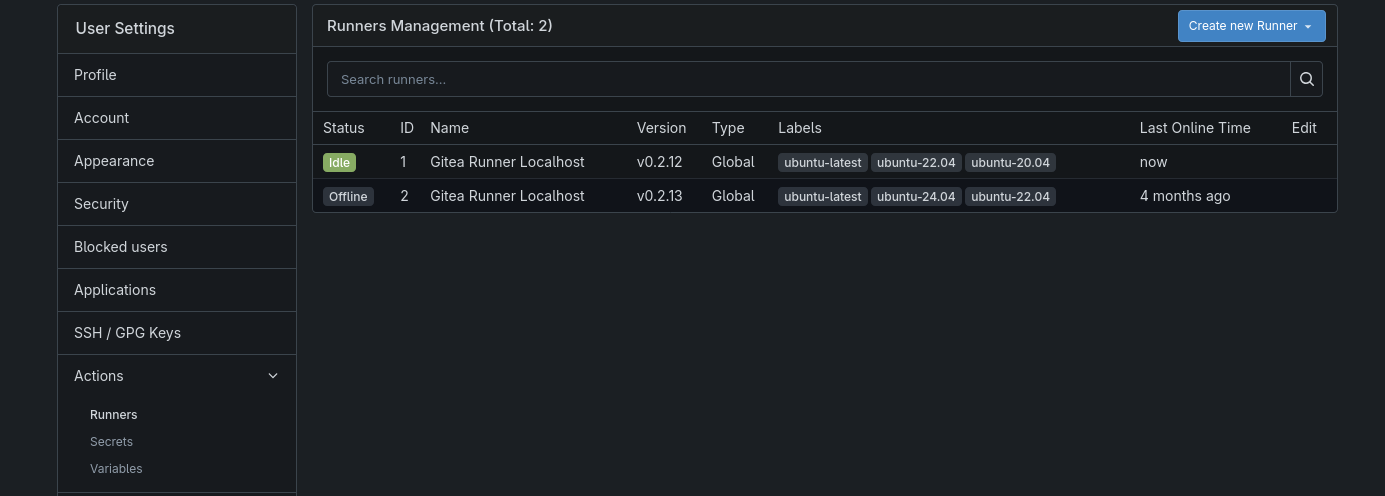
You will need to replace the Gitea token and add the runner in the Gitea admin panel.
Docker Registry
Docker Registry allows you to store Docker containers of the services you create. In my case, I store the containers on the same server that runs Gitea, although this service could be deployed on a separate server. To run this service, you could use the following docker-compose:
 1---
 2services:
 3  registry:
 4    image: registry:latest
 5    ports:
 6      - "5000:5000"
 7    environment:
 8      REGISTRY_AUTH: htpasswd
 9      REGISTRY_AUTH_HTPASSWD_REALM: Registry
10      REGISTRY_AUTH_HTPASSWD_PATH: /auth/registry.password
11      REGISTRY_STORAGE_FILESYSTEM_ROOTDIRECTORY: /registry-data
12    volumes:
13      - ./DockerRegistry/auth:/auth
14      - ./DockerRegistry/registry-data:/registry-data
15    restart:
16      always
To generate the password, you need to create the registry.password file like this:
1htpasswd -B -c /auth/registry.password "$DOCKERREGISTRY_USER" "$DOCKERREGISTRY_PASS"Real Application
As an example, here is the code for a microservice I currently use to return all geographic data from a pair of coordinates via an API. This small code only contains an unusual addition, the folder .gitea/workflows.
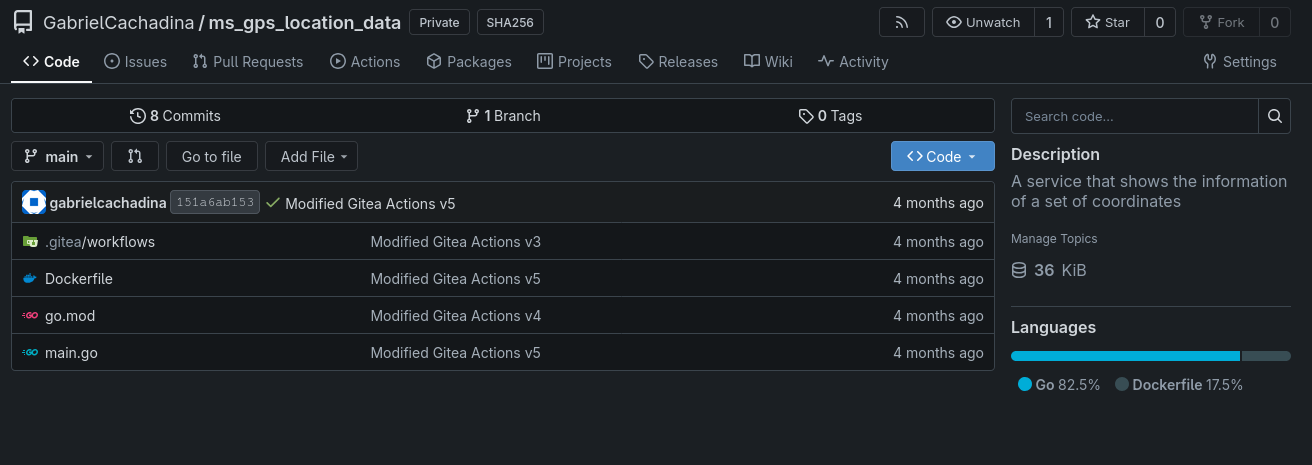 Inside the folder, I have a workflow that, when the code is updated, starts an Ubuntu machine, creates the Docker container, and uploads it to the Docker Registry:
 1name: Build and Push Docker Image (Go)
 2
 3on:
 4  push:
 5    branches:
 6      - main
 7
 8jobs:
 9  build-and-push:
10    runs-on: ubuntu-latest
11
12    steps:
13      - name: Manual Git clone from Gitea
14        run: |
15          git clone https://USERNAME:${{ secrets.GITEA_TOKEN }}@gitea.gabrielcachadina.com/GabrielCachadina/ms_gps_location_data.git
16          cd ms_gps_location_data
17          git checkout main
18
19      - name: Log in to Docker Registry
20        working-directory: ./ms_gps_location_data
21        run: |
22          echo "${{ secrets.DOCKER_PASSWORD }}" | docker login dockerregistry.gabrielcachadina.com -u "${{ secrets.DOCKER_USERNAME }}" --password-stdin
23
24      - name: Clean up Docker images
25        working-directory: ./ms_gps_location_data
26        run: |
27          docker image prune -f
28          docker image rm dockerregistry.gabrielcachadina.com/ms_gps_location_data:latest || true
29
30      - name: Build Docker image
31        working-directory: ./ms_gps_location_data
32        run: |
33          docker build --no-cache -t dockerregistry.gabrielcachadina.com/ms_gps_location_data:latest .
34
35      - name: Push Docker image
36        working-directory: ./ms_gps_location_data
37        run: docker push dockerregistry.gabrielcachadina.com/ms_gps_location_data:latest
Finally, to run this service on other servers, it could be done manually, but I prefer to spin up the microservices using Ansible. Specifically, I create a role for each service, with the role structure being like this:
1.
2├── defaults
3│   └── main.yml
4├── meta
5│   └── main.yml
6└── tasks
7    └── main.yml
And the tasks/main.yml file:
  1---
  2################# Directory Config #################
  3- name: Ensure application directory exists
  4  file:
  5    path: "{{ app_dest }}"
  6    state: directory
  7    owner: '1000'
  8    group: '1000'
  9    mode: '0755'
 10
 11- name: Ensure logs directory exists
 12  file:
 13    path: "{{ app_dest }}/logs"
 14    state: directory
 15    owner: '1000'
 16    group: '1000'
 17    mode: '0755'
 18################# Save the image localy #################
 19- name: Login to private Docker registry on controller
 20  delegate_to: localhost
 21  run_once: true
 22  community.docker.docker_login:
 23    registry_url: "dockerregistry.gabrielcachadina.com"
 24    username: "{{ dockerregistry_user }}"
 25    password: "{{ dockerregistry_pass }}"
 26  become: false
 27
 28- name: Pull Docker image on controller (ensure it's present)
 29  delegate_to: localhost
 30  run_once: true
 31  community.docker.docker_image:
 32    name: "{{ image_name }}"
 33    source: pull
 34    force_source: true
 35  become: false
 36
 37- name: Save Docker image on controller to temporary file
 38  delegate_to: localhost
 39  run_once: true
 40  command: >
 41    docker save {{ image_name }} -o /tmp/{{ container_name }}.tar
 42  become: false
 43
 44- name: Save Docker image on controller to temporary file
 45  delegate_to: localhost
 46  run_once: true
 47  command: >
 48    docker save {{ image_name }} -o /tmp/{{ container_name }}.tar
 49  become: false
 50
 51- name: Change the permissions for the tarball
 52  delegate_to: localhost
 53  run_once: true
 54  file:
 55    path: "/tmp/{{ container_name }}.tar"
 56    mode: "0644"
 57  become: false
 58
 59################# Push and Compile #################
 60
 61- name: Remove old container
 62  community.docker.docker_container:
 63    name: "{{ container_name }}"
 64    state: absent
 65    force_kill: true
 66
 67- name: Remove existing image from remote
 68  community.docker.docker_image:
 69    name: "{{ image_name }}"
 70    state: absent
 71
 72- name: Copy Docker image tarball to remote host
 73  copy:
 74    src: "/tmp/{{ container_name }}.tar"
 75    dest: "/tmp/{{ container_name }}.tar"
 76    mode: '0644'
 77
 78- name: Load Docker image from tarball
 79  community.docker.docker_image:
 80    name: "{{ image_name }}"
 81    load_path: "/tmp/{{ container_name }}.tar"
 82    source: load
 83    force_source: true
 84
 85- name: Remove temporary tar file from remote
 86  file:
 87    path: "/tmp/{{ container_name }}.tar"
 88    state: absent
 89
 90
 91- name: Start the container
 92  community.docker.docker_container:
 93    name: "{{ container_name }}"
 94    image: "{{ image_name }}"
 95    state: started
 96    restart_policy: "{{ restart_policy }}"
 97    privileged: yes
 98    network_mode: host
 99    env:
100      TZ: Europe/Madrid
101    volumes:
102      - "{{ app_dest }}/logs:/app/logs"
103    ports:
104      - "22003:22003"
105
106################# Clean from Localhost #################
107
108- name: Remove temporary tar file from controller (cleanup)
109  delegate_to: localhost
110  run_once: true
111  file:
112    path: "/tmp/{{ container_name }}.tar"
113    state: absent
114  become: false
115
116- name: Remove Docker image from controller (cleanup)
117  delegate_to: localhost
118  run_once: true
119  community.docker.docker_image:
120    name: "{{ image_name }}"
121    state: absent
122    force_absent: true
123  become: false
As a final note, I want to emphasize that all these services shown are behind a reverse proxy using NGINX, to ensure they use HTTPS and avoid security issues. Additionally, the ports used by the services are disabled within the firewall of the services.