Security in MQTT
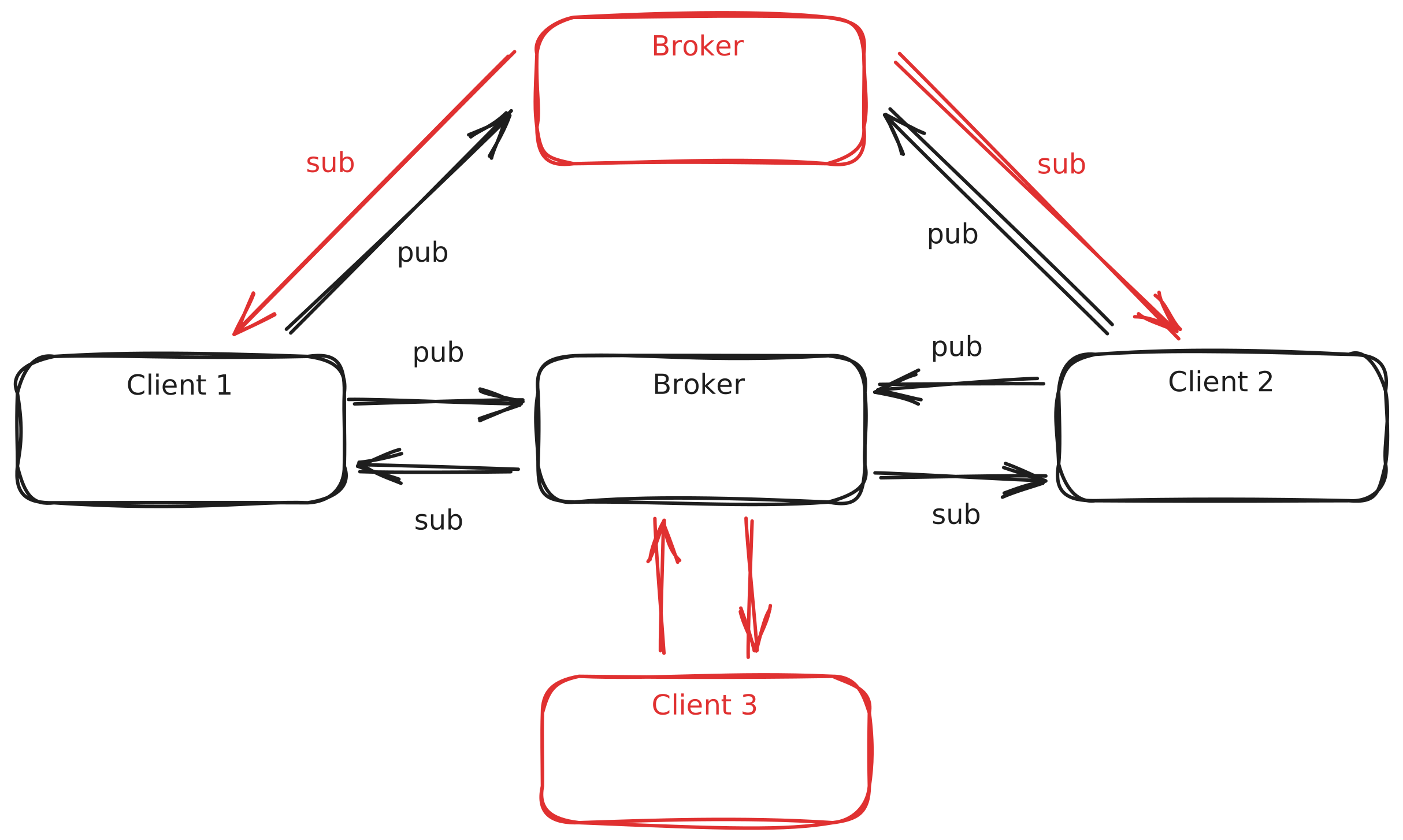
MQTT is a communication protocol that uses TCP/IP for devices to subscribe/publish to topics. The distribution of information from these topics is managed by a device called a broker, which handles the sending and receiving of information between devices.
 The problem arises when a hobby project wants to transition to a more industrial scope; in these cases, a default configuration of an
 MQTT server does not meet security standards because:
- Communication is not encrypted, meaning anyone who reads the information traffic will see all data from the communication, from the topic to which information is sent to the information itself, which poses a serious confidentiality issue.
- Any user can read and publish; knowing the broker’s IP, any user can read any topic and write to any topic, which poses a problem for both confidentiality and the integrity of the published data.
- The broker can be impersonated, with no way to verify that the broker is the original one; any device can spoof its IP and receive information from devices and send false information through any desired topics.
Solution to These Problems
Broker Identification
By using a private Certificate Authority (CA) that signs the broker’s certificate, clients can verify that they are connecting to the legitimate broker, thus avoiding impersonation, since all certificates must be issued by it, and any other broker that appears on the network will not have the correct credentials. This certificate can be obtained as follows:
 1# Construct subject strings
 2INFO_CA="/C=$COUNTRY/ST=$STATE/L=$CITY/O=$ORG/OU=CA/CN=${PROJECT}-Root-CA"
 3INFO_SERVER="/C=$COUNTRY/ST=$STATE/L=$CITY/O=$ORG/OU=Server/CN=mqtt.${PROJECT}.com"
 4
 5# Step 1: Generate CA
 6openssl req -x509 -nodes -sha256 -newkey rsa:2048 \
 7-subj "$INFO_CA" -days 99999 \
 8-keyout ca.key -out ca.crt
 9
10# Step 2: Generate server SAN config (include both DNS and IP)
11cat > server_ext.cnf <<EOF
12subjectAltName=DNS:mqtt.${PROJECT}.com,IP:${SERVER_IP}
13EOF
14
15# Step 3: Generate Server Key + CSR
16openssl req -nodes -sha256 -newkey rsa:2048 \
17-subj "$INFO_SERVER" -keyout server/server.key -out server/server.csr
18
19# Step 4: Sign Server Cert with CA
20openssl x509 -req -sha256 -in server/server.csr \
21-CA ca.crt -CAkey ca.key -CAcreateserial \
22-out server/server.crt -days 99999 \
23-extfile server_ext.cnf
Client Identification
All clients must have a key signed by the broker, which will create a secure communication channel between the broker and the client. You can have a single key for all clients or one key per client, depending on the desired security level of the system.
 1# --- Generate client certificate signed by the project CA ---
 2INFO_CLIENT="/C=$COUNTRY/ST=$STATE/L=$CITY/O=$ORG/OU=Client/CN=${CLIENT}"
 3
 4# Generate client key + CSR
 5openssl req -new -nodes -sha256 \
 6-subj "$INFO_CLIENT" -out "${CLIENT_DIR}/client.csr" -keyout "${CLIENT_DIR}/client.key"
 7
 8# Sign client cert with project CA
 9openssl x509 -req -sha256 -in "${CLIENT_DIR}/client.csr" \
10-CA "${PROJECT_DIR}/ca.crt" -CAkey "${PROJECT_DIR}/ca.key" -CAcreateserial \
11-out "${CLIENT_DIR}/client.crt" -days 99999
Client Limitation
Even if clients have a unique key for each device, it should not be allowed for any device to say or read whatever it pleases; therefore, clients should be limited to certain topics.
Users
Users allow for more granular access to resources. To create a user, a username and password must be established.
1USER="mqttuser"
2PASS="mypassword"
3
4HASH=$(python3 -c "import crypt; print(crypt.crypt('$PASS', crypt.mksalt(crypt.METHOD_SHA512)))")
5
6echo "$USER:$HASH" | sudo tee /etc/mosquitto/passwd > /dev/null
User Topic Restrictions
To achieve this, the aclfile will be edited with the permissions of each user and the topics they can read or publish.
For example, in this case, there are two users: one has access to read and write any topic, and the other user only has access to read topics that start with test/ (the # is used as a wildcard).
user username1
topic write #
topic read #

user username2
topic read test/#
MQTT Configuration
Now that all this is known, a MQTT server can be configured as follows:
├── certs
│   ├── aclfile
│   ├── ca.crt
│   ├── passwd
│   ├── server.crt
│   └── server.key
└── mosquitto.conf
mosquitto.conf
allow_anonymous false
listener 8883

password_file /mosquitto/config/certs/passwd
acl_file /mosquitto/config/certs/aclfile

cafile /mosquitto/config/certs/ca.crt
certfile /mosquitto/config/certs/server.crt
keyfile /mosquitto/config/certs/server.key

require_certificate true
use_identity_as_username true
docker-compose.yml
 1services:
 2  mqtt5:
 3    image: eclipse-mosquitto:latest
 4    container_name: mqtt5
 5    volumes:
 6      - ./Mqtt:/mosquitto/config/
 7      - ./Mqtt/data:/mosquitto/data:rw
 8      - ./Mqtt/log:/mosquitto/log:rw
 9    ports:
10      - '8883:8883'
11    networks:
12      - default
13    restart: unless-stopped
passwd
Test:$6$PHvuLoqs2dHc4Xfb$4SlRmtoPzWrmZkOn7x/0J1MiQVZsPvoXdftuXnmnOR25xFzPAVFyVtg4cOJActJ4LJf1erz2G/S5uVsjRiRm7Q==aclfile
user username1
topic write #
topic read #

user username2
topic read test/#
Script
The following script is able to create a certificate of authority, certificates for the users and is able to test the MQTT broker by subscribing or publishing to a topic:
  1#!/bin/bash
  2
  3clear
  4tree .
  5
  6# -----------------------------
  7# Location info and base dirs
  8# -----------------------------
  9COUNTRY="ES"
 10STATE="Badajoz"
 11CITY="Badajoz"
 12ORG="SScertificate"
 13BASE_DIR="./"
 14
 15# =========================================================
 16# Create Project (CA + Server certificate)
 17# =========================================================
 18create_project() {
 19
 20  echo "Creating new project..."
 21
 22  read -p "Enter project name: " PROJECT
 23  read -p "Enter server IP address: " SERVER_IP
 24
 25  PROJECT_DIR="${BASE_DIR}${PROJECT}"
 26  SERVER_DIR="${PROJECT_DIR}/server"
 27
 28  INFO_CA="/C=$COUNTRY/ST=$STATE/L=$CITY/O=$ORG/OU=CA/CN=${PROJECT}-Root-CA"
 29  INFO_SERVER="/C=$COUNTRY/ST=$STATE/L=$CITY/O=$ORG/OU=Server/CN=mqtt.${PROJECT}.com"
 30
 31  mkdir -p "${SERVER_DIR}"
 32  cd "${PROJECT_DIR}" || exit 1
 33
 34  # --- Generate CA ---
 35  openssl req -x509 -nodes -sha256 -newkey rsa:2048 \
 36    -subj "$INFO_CA" -days 99999 \
 37    -keyout ca.key -out ca.crt
 38
 39  # --- Server SAN (DNS + IP) ---
 40  cat > server_ext.cnf <<EOF
 41subjectAltName=DNS:mqtt.${PROJECT}.com,IP:${SERVER_IP}
 42EOF
 43
 44  # --- Server key + CSR ---
 45  openssl req -nodes -sha256 -newkey rsa:2048 \
 46    -subj "$INFO_SERVER" \
 47    -keyout server/server.key \
 48    -out server/server.csr
 49
 50  # --- Sign server cert ---
 51  openssl x509 -req -sha256 \
 52    -in server/server.csr \
 53    -CA ca.crt -CAkey ca.key -CAcreateserial \
 54    -out server/server.crt \
 55    -days 99999 \
 56    -extfile server_ext.cnf
 57
 58  cp ca.crt server/ca.crt
 59
 60  rm -f server/server.csr server_ext.cnf *.srl
 61
 62  echo "Project '${PROJECT}' initialized (Server IP: ${SERVER_IP})"
 63}
 64
 65# =========================================================
 66# Add Client
 67# =========================================================
 68add_client() {
 69
 70  echo "Adding new client..."
 71
 72  read -p "Enter project name: " PROJECT
 73  read -p "Enter client name: " CLIENT
 74  read -s -p "Enter password for ${CLIENT}: " CLIENT_PASS
 75  echo
 76  read -s -p "Confirm password: " CLIENT_PASS2
 77  echo
 78
 79  [[ "$CLIENT_PASS" != "$CLIENT_PASS2" ]] && echo "Passwords do not match." && exit 1
 80
 81  PROJECT_DIR="${BASE_DIR}${PROJECT}"
 82  CLIENT_DIR="${PROJECT_DIR}/${CLIENT}"
 83  PASSWORD_FILE="${PROJECT_DIR}/passwd"
 84
 85  [[ ! -d "$PROJECT_DIR" ]] && echo "Project not found." && exit 1
 86
 87  mkdir -p "$CLIENT_DIR"
 88
 89  if [[ ! -f "$PASSWORD_FILE" ]]; then
 90    mosquitto_passwd -c -b -H sha512 "$PASSWORD_FILE" "$CLIENT" "$CLIENT_PASS"
 91  else
 92    mosquitto_passwd -b -H sha512 "$PASSWORD_FILE" "$CLIENT" "$CLIENT_PASS"
 93  fi
 94
 95  chmod 0700 "$PASSWORD_FILE"
 96
 97  INFO_CLIENT="/C=$COUNTRY/ST=$STATE/L=$CITY/O=$ORG/OU=Client/CN=${CLIENT}"
 98
 99  openssl req -new -nodes -sha256 \
100    -subj "$INFO_CLIENT" \
101    -out "${CLIENT_DIR}/client.csr" \
102    -keyout "${CLIENT_DIR}/client.key"
103
104  openssl x509 -req -sha256 \
105    -in "${CLIENT_DIR}/client.csr" \
106    -CA "${PROJECT_DIR}/ca.crt" \
107    -CAkey "${PROJECT_DIR}/ca.key" \
108    -CAcreateserial \
109    -out "${CLIENT_DIR}/client.crt" \
110    -days 99999
111
112  cp "${PROJECT_DIR}/ca.crt" "${CLIENT_DIR}/ca.crt"
113
114  rm -f "${CLIENT_DIR}/client.csr" "${PROJECT_DIR}"/*.srl
115
116  echo "Client '${CLIENT}' added to project '${PROJECT}'"
117}
118
119# =========================================================
120# Test MQTT (IP SELECTABLE)
121# =========================================================
122test_mqtt() {
123
124  echo "Testing MQTT..."
125
126  PROJECTS=($(find "$BASE_DIR" -maxdepth 1 -mindepth 1 -type d))
127  [[ ${#PROJECTS[@]} -eq 0 ]] && echo "No projects found." && exit 1
128
129  echo "Available projects:"
130  select PROJECT in "${PROJECTS[@]##*/}"; do
131    [[ -n "$PROJECT" ]] && break
132  done
133
134  PROJECT_DIR="${BASE_DIR}${PROJECT}"
135
136  CLIENTS=($(find "$PROJECT_DIR" -maxdepth 1 -mindepth 1 -type d ! -name "server"))
137  [[ ${#CLIENTS[@]} -eq 0 ]] && echo "No clients found." && exit 1
138
139  echo "Available clients:"
140  select CLIENT_DIR in "${CLIENTS[@]}"; do
141    [[ -n "$CLIENT_DIR" ]] && CLIENT=$(basename "$CLIENT_DIR") && break
142  done
143
144  read -s -p "Enter password for ${CLIENT}: " PASSWORD
145  echo
146
147  read -p "Enter MQTT server IP or hostname: " SERVER_IP
148
149  echo "Choose action:"
150  select ACTION in "Publish" "Subscribe"; do
151    case $ACTION in
152      Publish ) MODE="pub"; break ;;
153      Subscribe ) MODE="sub"; break ;;
154    esac
155  done
156
157  read -p "Enter topic: " TOPIC
158
159  BASE_CMD="mosquitto_${MODE} \
160    --cafile ${CLIENT_DIR}/ca.crt \
161    --cert ${CLIENT_DIR}/client.crt \
162    --key ${CLIENT_DIR}/client.key \
163    -h ${SERVER_IP} \
164    -p 8883 \
165    -u ${CLIENT} \
166    -P ${PASSWORD} \
167    -t ${TOPIC}"
168
169  if [[ "$MODE" == "pub" ]]; then
170    echo "Publishing mode (Ctrl+C to exit)"
171    while true; do
172      read -p "Message: " MESSAGE
173      [[ -n "$MESSAGE" ]] && $BASE_CMD -m "$MESSAGE"
174    done
175  else
176    echo "Subscribing..."
177    $BASE_CMD
178  fi
179}
180
181# =========================================================
182# Main Menu
183# =========================================================
184echo "Select an action:"
185select ACTION in "Create Project" "Add Client" "Test MQTT" "Exit"; do
186  case $ACTION in
187    "Create Project" ) create_project ;;
188    "Add Client" ) add_client ;;
189    "Test MQTT" ) test_mqtt ;;
190    "Exit" ) exit 0 ;;
191    * ) echo "Invalid choice" ;;
192  esac
193done